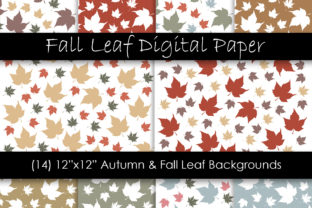
Autumn Fall Leaf Digital Papers
Autumn Fall Leaf Digital Papers are ready-to-use, high-resolution 12×12 inch background files designed for digital crafting, print production, and visual communication. Each of the 14 included patterns features fall leaves in rich, natural variations—crimson, burnt orange, golden yellow, deep burgundy, olive, rust, and soft amber—rendered at 300 DPI for crisp output whether printed or displayed on screen. They arrive as a single .zip file containing 14 individual .JPG files, delivered instantly after purchase.
These aren’t decorative extras—they’re functional assets built into real workflows. Whether you're designing a seasonal newsletter, preparing classroom handouts, building a brand’s limited-edition product packaging, or assembling a client’s editorial layout, Autumn Fall Leaf Digital Papers serve as consistent, professional-grade foundations that reduce decision fatigue and accelerate execution.
Where They Fit in Your Workflow
Digital papers like these rarely exist in isolation. They slot into specific phases: pre-production (planning and asset gathering), active creation (designing, editing, formatting), and post-delivery (rebranding, repurposing, archiving). For example, a small business owner launching a fall-themed email campaign might download Autumn Fall Leaf Digital Papers during the prep phase—before finalizing copy or selecting fonts—to lock in visual tone early. That decision then informs typography choices, photo filters, and even subject-line language (“Warm up your inbox with autumn hues”).
In contrast, an educator preparing printable reading comprehension worksheets may use them mid-process—after drafting questions but before adding clipart or borders—to unify the look across multiple grade-level versions. The consistency saves time when printing batches or sharing via LMS platforms where visual cohesion supports student focus.
Integration With Common Tools and Platforms
Because they’re standard .JPG files at industry-standard dimensions and resolution, Autumn Fall Leaf Digital Papers integrate seamlessly with tools used daily across professions:
- Design software: Drag-and-drop into Adobe Photoshop, Illustrator, Canva Pro, Affinity Designer, or Figma as base layers or texture overlays.
- Word processors & presentation tools: Insert directly into Microsoft Word, Google Docs, PowerPoint, or Keynote as page backgrounds—ideal for seasonal reports, pitch decks, or parent newsletters.
- Print-on-demand services: Upload to platforms like Printful, Gelato, or VistaPrint for custom notebooks, greeting cards, or wall art without resizing or quality loss.
- Learning management systems: Embed in PDF handouts or HTML modules in Canvas, Moodle, or Schoology to add tactile warmth to otherwise text-heavy materials.
No plugins, converters, or subscriptions are needed. There’s no vendor lock-in—just clean, portable files compatible with both cloud-based and desktop-native environments.
Practical Implementation Tips
Start by organizing the 14 files meaningfully—not just by color, but by intended use case. Rename them with descriptive prefixes: afldp-amber-maple-bg, afldp-deep-rust-overlay, afldp-golden-sycamore-print. This pays off when scanning folders mid-project or handing assets to a team member.
Test one pattern at a time in your target output environment. A leaf motif that reads beautifully on screen may overwhelm small-print text if used as a full-page background in a tri-fold brochure. Try layering it at 15–30% opacity behind light-colored text boxes—or use it strictly for section dividers, headers, or border accents.
If you’re managing multiple seasonal campaigns across a year, treat Autumn Fall Leaf Digital Papers as part of a larger asset library. Store them alongside spring florals, summer geometrics, and winter textures in a shared drive or digital asset management tool. Tag each with metadata like “season: fall”, “use: print”, “color palette: warm”, so retrieval stays fast and precise—even six months later.
Quality Control and Long-Term Usability
The 300 DPI resolution ensures fidelity across formats—but usability depends on how you maintain and apply them over time. Avoid resampling or stretching beyond 12×12 inches unless your output medium explicitly supports interpolation (e.g., large-format digital signage). When scaling down for web thumbnails or social previews, export new optimized versions rather than relying on browser-resized originals.
Check contrast ratios if placing text over any pattern. Not all leaf arrangements offer uniform density; some have clustered foliage in corners and open space near the center. Use a quick contrast checker (like WebAIM’s tool) when overlaying body copy to ensure readability meets WCAG 2.1 AA standards—especially important for educators, marketers, and public-facing content creators.
Also note: These are flat .JPGs—not layered PSDs or vector files. That means no editable elements (no moving individual leaves or adjusting stem angles), but also no risk of missing fonts or broken links. What you see is what you get—and what you get is production-ready.
Real-World Use Cases Across Roles
A freelance graphic designer might use Autumn Fall Leaf Digital Papers to build a cohesive mood board for a café rebrand—pairing one pattern with coffee bean photography and handwritten menu mockups. The same file then becomes the background for their proposal PDF, reinforcing visual continuity from pitch to execution.
A blogger documenting home organization routines could insert a subtle leaf pattern as a background for Pinterest pins linking to fall-cleaning checklists—adding seasonal relevance without distracting from actionable steps.
A publisher developing a poetry chapbook with autumn themes might assign different patterns to each section—using cooler tones for reflective pieces and warmer ones for celebratory verses—creating subconscious rhythm through visual pacing.
For small business owners running Etsy shops or local craft fairs, these papers work double duty: as printable gift tags, packaging inserts, or backdrop photos for product flat-lays. Because they’re print-ready, there’s no guesswork about bleed, margins, or CMYK conversion—just upload and go.
Efficiency Gains You’ll Notice Immediately
Time saved isn’t just about skipping a design step—it’s about reducing cognitive load. Instead of debating which hex code best evokes “crisp October air”, you select a pattern that already embodies the feeling. That mental bandwidth shifts toward strategy, messaging, or user experience instead of pixel-level decisions.
You’ll also notice fewer version-control headaches. When collaborating, sharing a named .JPG file is simpler than explaining “the one with the curled maple leaf in the bottom right”. Version history stays clean. Revisions stay focused on content—not aesthetics.
And because the set includes 14 distinct options—not just shades of one motif—you retain flexibility without sacrificing cohesion. One pattern can anchor your main branding; another can differentiate sub-pages or supporting materials. That variety supports hierarchy and intentionality, not randomness.
Making It Sustainable
Treat Autumn Fall Leaf Digital Papers as reusable infrastructure—not disposable decor. Save edited versions (e.g., cropped sections, masked overlays, color-inverted variants) in a dedicated “derived assets” folder. Document how each was used: “Used as header bg in Q4 client report, 2023”. Over time, this builds institutional memory—valuable whether you’re solo or leading a team.
Finally, revisit your usage annually. Does the same pattern still reflect your current voice? Has your audience’s expectation shifted? The fact that these are digital—not physical—means updating is frictionless. Swap one in, keep the rest, and move forward—without reinventing the wheel.